配置详解
本主题采用「双工厂」配置体系:defineConfig 负责 VitePress 的工程层配置,defineThemeConfig 负责主题外观与功能层配置。理解二者的关系与分工,是定制本主题的关键。
还没有配置文件?
运行 npx vitepress-theme-ninc init 可一键生成本页涉及的全部配置文件(config.mts、themeConfig.ts、theme/index.ts),详见 快速上手。
通过 npm 安装即可使用全部配置
本主题的所有配置项均通过 npm 包导出,无需修改主题源码。Node 端代码(defineConfig / defineThemeConfig)在发布前已编译为 .js,客户端代码由 Vite 在构建时处理。你只需要 pnpm add vitepress-theme-ninc 即可获得全部能力。
双工厂配置体系
本主题在 VitePress 原生配置之上抽象出两个工厂函数,分别负责不同层级的配置。
defineConfig — 决定「怎么构建」
放在 .vitepress/config.mts 里,负责工程层:注入 Vite 插件、Markdown 扩展、sitemap、RSS、PWA、外链中转,并合并 VitePress 顶层配置。
// .vitepress/config.mts
import { defineConfig } from 'vitepress-theme-ninc/defineConfig'
defineThemeConfig — 决定「长什么样、有什么功能」
放在 .vitepress/themeConfig.ts 里,负责外观与功能层:导航、评论、搜索、音乐、侧边栏等。你传入的配置会与主题内置的默认配置深合并(defu),只写想改的字段即可。
// .vitepress/themeConfig.ts
import { defineThemeConfig } from 'vitepress-theme-ninc/defineThemeConfig'
二者的关系
调用链路自上而下:
┌─────────────────────────────────────────────┐
│            .vitepress/config.mts            │
│                                             │
│   defineConfig(userConfig, themeConfig, {   │
│     // options: 路径、插件开关、PWA 等       │
│   })                                        │
│                                             │
│   ├─ userConfig      → VitePress 顶层配置    │
│   ├─ userThemeConfig → 透传给主题运行时       │
│   └─ options         → 参数化构建行为         │
└──────────────────────┬──────────────────────┘
                       │
                       ▼
┌─────────────────────────────────────────────┐
│          .vitepress/themeConfig.ts          │
│                                             │
│   defineThemeConfig({                       │
│     siteMeta, nav, comment, search, ...     │
│   })  ← 与 defaultThemeConfig 深合并(defu) │
└─────────────────────────────────────────────┘简单来说:defineConfig 决定「怎么构建」,defineThemeConfig 决定「长什么样、有什么功能」。前者管工程,后者管外观,互不干扰。
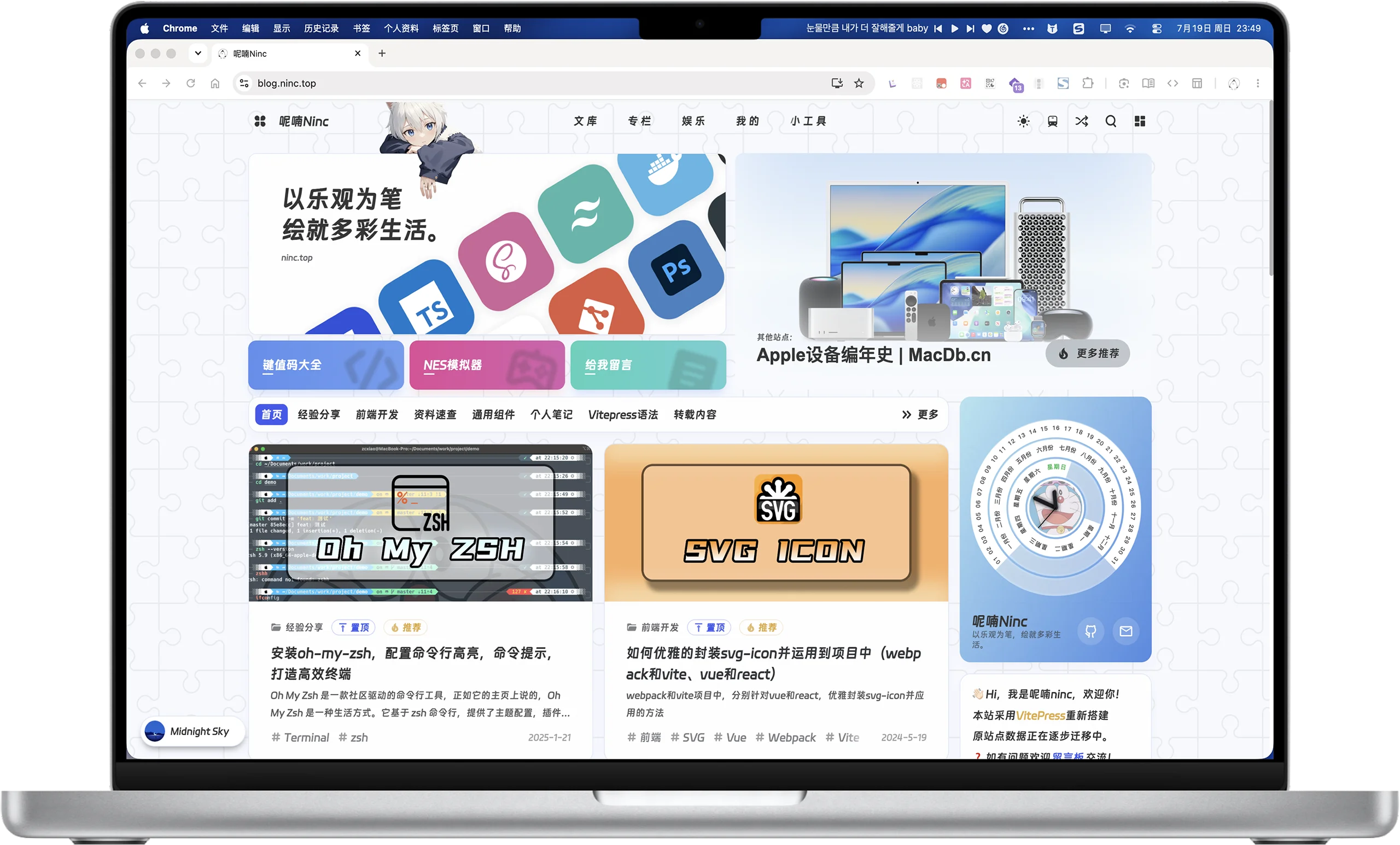
下图展示了配置合并后实际渲染的博客首页:
defineConfig 详解
defineConfig 是对 VitePress 原生 defineConfig 的封装。它接收三个参数:
export function defineConfig(
  userConfig: UserConfig = {},        // VitePress 顶层配置覆盖
  userThemeConfig: UserThemeConfig = {}, // 主题配置(合并到默认)
  options: DefineConfigOptions = {}    // 参数化选项
): UserConfiguserConfig:透传给 VitePress 原生defineConfig,可覆盖title、description、sitemap、head、markdown等任何 VitePress 顶层字段。userThemeConfig:通常从themeConfig.ts导入,会被注入到运行时主题配置中。options:本主题独有的参数化选项,用于指定文章目录、RSS 输出、SVG 扫描目录、PWA、插件开关等。
下面是一个接近真实的完整示例:
// .vitepress/config.mts
import { defineConfig } from 'vitepress-theme-ninc/defineConfig'
import { themeConfig } from './themeConfig'
import groupIconConfig from './groupIconConfig.json'

export default defineConfig(
  { sitemap: { hostname: 'https://example.com' } },
  themeConfig,
  {
    groupIconConfig,
    demoDir: new URL('../posts/components', import.meta.url).pathname
  }
)
示例里没有 defineThemeConfig,它去哪了?
注意上面第 2 行 import { themeConfig } from './themeConfig'——这里的 themeConfig 是从同目录的 themeConfig.ts 文件导入的已经定义好的对象。而 defineThemeConfig 正是在那个文件里使用的:
// .vitepress/themeConfig.ts
import { defineThemeConfig } from 'vitepress-theme-ninc/defineThemeConfig'

export const themeConfig = defineThemeConfig({
  // 在这里写 nav、comment、search 等外观/功能配置
})也就是说:defineThemeConfig 在 themeConfig.ts 中创建 themeConfig,config.mts 只是把它引进来作为 defineConfig 的第二参数。两个工厂函数分别住在两个文件里,各司其职。文末 完整示例 给出了三份文件的完整对照。
options 字段表
defineConfig 第三参数 options 的全部字段如下:
| 参数名 | 类型 | 默认值 | 说明 |
|---|---|---|---|
postsDir | string | <cwd>/posts | 文章源目录,主题从该目录读取 Markdown 文章 |
rssOutput | string | <outDir>/rss.xml | RSS 文件输出路径,默认写入 VitePress 构建输出目录 |
svgIconDirs | string[] | [<cwd>/public/svg] | SVG 雪碧图扫描目录,多个目录会合并聚合 |
groupIconConfig | Record<string, any> | — | 代码组图标配置,通常从一个 JSON 文件导入 |
demoDir | string | <cwd>/posts/components | vitepress-demo-plugin 的组件 demo 目录 |
pwa | false | — | 设为 false 显式关闭 PWA 包装 |
pwaManifest | Record<string, any> | — | PWA manifest 字段覆盖 |
pwaWorkbox | Record<string, any> | — | PWA workbox 配置覆盖 |
plugins | PluginSwitches | — | Vite 插件开关,将任一项设为 false 即禁用对应插件 |
extraComponentDirs | string[] | — | 额外的组件扫描目录,补充到 unplugin-vue-components |
autoImportDtsPath | string | <cwd>/.vitepress/auto-imports.d.ts | unplugin-auto-import 的 dts 输出路径 |
componentsDtsPath | string | <cwd>/.vitepress/components.d.ts | unplugin-vue-components 的 dts 输出路径 |
cryptoSecretKeyFile | string | — | 站点加密密钥文件路径,仅用于加密文章(crypto.enable: true)。指向一个本地文本文件,文件全部内容即作为站点密钥。访问者上传的密钥文件内容必须与此文件内容完全一致才能解锁加密文章。未配置时主题会使用内置兜底密钥(公开在源码中,无真正安全可言)并打印警告,项目仍可正常启动。详见 加密文章 |
cwd 与 outDir
<cwd> 指执行构建时的工作目录(通常是项目根目录);<outDir> 指 VitePress 的构建输出目录,默认为 .vitepress/dist,可在 userConfig 中通过 outDir 覆盖。
内置默认行为
defineConfig 在内部设置了以下 VitePress / Vite 默认值。这些值不需要手动配置,但了解它们有助于排查问题:
VitePress 顶层配置
| 配置项 | 默认值 | 说明 |
|---|---|---|
cleanUrls | true | URL 不带 .html 后缀 |
lastUpdated | true | 显示文章最后更新时间 |
appearance | false | 关闭 VitePress 原生暗色切换(本主题自实现暗色模式) |
srcExclude | ['**/README.md', '**/TODO.md'] | 排除 README 和 TODO 文件 |
Markdown 配置
| 配置项 | 默认值 | 说明 |
|---|---|---|
math | true | 启用数学公式渲染 |
lineNumbers | true | 代码块显示行号 |
toc.level | [1, 2, 3, 4] | 目录提取 h1-h4 |
image.lazyLoading | true | 图片懒加载 |
Vite 构建配置
| 配置项 | 默认值 | 说明 |
|---|---|---|
build.minify | 'terser' | 使用 terser 压缩 |
terserOptions.compress.pure_funcs | ['console.log', 'console.info', 'console.debug'] | 生产构建移除 log/info/debug 输出(保留 console.error/console.warn,供运行时错误处理与降级提示使用) |
terserOptions.compress.drop_debugger | true | 生产构建移除 debugger |
optimizeDeps.include | ['vue', 'vitepress-theme-ninc > pinia', '> element-plus', '> lodash-es', '> dayjs', '> crypto-js', '> nprogress', '> vue-instantsearch/vue3/es', ...] | 预构建依赖;vitepress-theme-ninc > dep 为 pnpm 嵌套解析语法(依赖不提升到顶层时也能从主题包内解析) |
生产构建移除 console
生产构建会自动移除 console.log/console.info/console.debug 与 debugger 语句(console.error/console.warn 会保留)。如果需要在生产环境调试,可临时在 defineConfig 第一参数中覆盖 build.minify 配置。
RSS 自动生成
defineConfig 在 buildEnd 阶段自动调用 createRssFile 生成 RSS 订阅文件(rss.xml),无需手动配置。RSS 生成依赖以下 themeConfig.siteMeta 字段:
| 字段 | 用途 |
|---|---|
siteMeta.title | RSS 频道标题 |
siteMeta.description | RSS 频道描述 |
siteMeta.site | RSS 链接基准地址 |
siteMeta.author.email | RSS 作者邮箱 |
RSS 默认包含最近 10 篇非加密文章,按 frontmatter date 降序排列。加密文章(crypto.enable: true)自动排除。输出位置由 options.rssOutput 控制。
Sitemap 过滤规则
defineConfig 内置 sitemap.transformItems,自动过滤以下路径(不写入 sitemap.xml):
pages/目录下的页面(pages/nes与pages/utils/子目录除外)page/分页路由(如/page/2)posts/encrypted/加密文章
保留的路径:
posts/下的非加密文章(含posts/demo/组件 demo 文章)pages/nes、pages/utils/下的工具页- 根级页面(如首页
/、根级about.md对应的/about;注意pages/about.md等pages/下页面按上述规则被排除)
PWA 默认配置
当 options.pwa 不为 false 时,主题使用以下默认 PWA 配置:
Manifest 默认值(由 derivePwaManifest 派生):
| 字段 | 默认值 |
|---|---|
name | 取自 siteMeta.title |
short_name | 取自 siteMeta.title |
start_url | siteMeta.base(未配置时 /) |
display | standalone |
theme_color | #fff |
background_color | #efefef |
icons | [/images/cxLogo/favicon-32x32.webp, /images/cxLogo/favicon-96x96.webp, /images/cxLogo/favicon-256x256.webp, /images/cxLogo/favicon-512x512.webp] |
PWA 图标文件
默认 manifest 引用了 4 张图标文件(/images/cxLogo/favicon-{32x32,96x96,256x256,512x512}.webp),需在 public/images/cxLogo/ 下放置。若文件缺失,PWA 安装后图标为空白,不影响其他功能。可通过 options.pwaManifest 覆盖默认图标路径。
Workbox 默认值(defaultPwaWorkbox):
| 字段 | 默认值 | 说明 |
|---|---|---|
maximumFileSizeToCacheInBytes | 10 * 1024 * 1024(10MB) | 允许缓存的单个文件最大体积 |
globPatterns | ['**/*.{js,css,html,ico,png,jpg,jpeg,gif,svg,woff2,ttf}'] | 预缓存文件匹配规则 |
navigateFallbackDenylist | [/^\/sitemap\.xml$/, /^\/rss\.xml$/, /^\/robots\.txt$/] | 导航回退排除项 |
runtimeCaching | 4 条规则 | 见下表 |
Runtime Caching 规则:
| 匹配模式 | 策略 | 缓存时长 |
|---|---|---|
CSS 文件(**/*.css) | CacheFirst | 未设置过期时间 |
字体文件(**/*.{woff2,woff,ttf}) | CacheFirst | 365 天,最多 10 项 |
| 图片文件(常见图片格式) | CacheFirst | 30 天,最多 10 项 |
iconfont CDN(cdn2.codesign.qq.com) | CacheFirst | 2 天,最多 10 项 |
PluginSwitches 开关说明
options.plugins 字段允许你按需关闭内置 Vite 插件。每一项的值设为 false 即禁用:
interface PluginSwitches {
  alias?: false         // 路径别名插件(@ → 主题 client 目录)
  vueJsx?: false        // @vitejs/plugin-vue-jsx(JSX/TSX 支持,⚠️ 主题 TopGroup.vue 有一处 JSX,关闭后该文件编译失败)
  vueMcp?: false        // Vue MCP 开发工具
  groupIcons?: false    // 代码组图标(关闭后由内置 stub 兜底,不影响构建)
  codeInspector?: false // code-inspector 点击定位
  compression?: false   // Gzip + Brotli 压缩
  autoImport?: false    // unplugin-auto-import(⚠️ 硬依赖,关闭后主题无法构建)
  components?: false    // unplugin-vue-components(⚠️ 硬依赖,关闭后组件无法自动注册)
  svgIcons?: false      // vite-plugin-svg-icons(关闭后由内置 stub 兜底,不影响构建)
}
可安全关闭的插件
以下插件关闭后主题仍能正常构建和运行,只是对应功能不再生效:
| 插件 | 关闭后影响 |
|---|---|
compression | 不生成 .gz / .br 压缩文件 |
codeInspector | 开发模式下无法点击组件跳转到编辑器 |
vueMcp | 开发模式下无法使用 Vue MCP 调试工具 |
alias | @ 别名不可用(需手动使用完整导入路径) |
groupIcons | 代码组不显示图标(虚拟 CSS 由 stub 提供,构建不受影响) |
svgIcons | <SvgIcon> 组件不渲染图标(虚拟模块由 stub 提供,构建不受影响) |
不可关闭的硬依赖
以下三个插件是主题运行的基石,关闭后会导致构建失败或页面报错:
autoImport:主题的.vue文件未显式import { ref, computed, onMounted, useRoute, ... } from 'vue'/'vitepress',完全依赖此插件自动注入。关闭后所有使用 Vue API 的组件都会抛出ReferenceError。components:主题的App.vue等文件通过标签名直接使用<Background />、<Nav />、<Post />等组件而不显式导入,依赖此插件自动注册。关闭后这些组件无法解析。vueJsx:主题views/home_top/TopGroup.vue的「今日卡片」提示使用了 JSX 语法($vmessage.info(<div ...>…</div>))。关闭后该文件在编译期即报语法错误,构建失败。
示例:关闭压缩与 code-inspector 以加快本地开发:
defineConfig(
  {},
  themeConfig,
  {
    plugins: {
      compression: false,
      codeInspector: false
    }
  }
)
autoImport / components / vueJsx 不可关闭
autoImport、components、vueJsx 是主题硬依赖,关闭后构建必然失败。svgIcons 和 groupIcons 已有内置 stub 兜底,可安全关闭。其余插件按需关闭即可。
PWA 降级机制
PWA 能力依赖可选依赖 @vite-pwa/vitepress。本主题采用「自动降级」策略:
- 已安装
@vite-pwa/vitepress:defineConfig会自动用withPwa包装 VitePress 配置,生成 Service Worker 与 Manifest。 - 未安装
@vite-pwa/vitepress:主题不会抛出错误,而是在构建时打印一条警告,并跳过 PWA 包装,其余功能不受影响。 - 显式关闭:若你确定不需要 PWA,可在
options中设置pwa: false以关闭警告:
defineConfig(
  {},
  themeConfig,
  { pwa: false }
)
你还可以通过 pwaManifest 覆盖 manifest 字段,通过 pwaWorkbox 自定义 workbox 行为(如预缓存规则、运行时缓存策略)。
深合并机制详见 主题配置详解 - defu 深合并机制
主题配置顶层字段详见 主题配置详解 - 顶层字段总览
完整示例
基础接入示例(config.mts)见前文 defineConfig 详解,以下展示主题入口与主题配置文件的写法。完整 themeConfig 字段示例见 主题配置详解 - 完整配置片段。
import Theme from 'vitepress-theme-ninc'

export default Themeimport { defineThemeConfig } from 'vitepress-theme-ninc/defineThemeConfig'
export const themeConfig = defineThemeConfig({
siteMeta: {
title: '示例博主',
description: '以乐观为笔,绘就多彩生活。',
avatar: '/images/avatar.svg',
logo: '/images/logo.svg',
site: 'https://example.com',
base: '/',
lang: 'zh-CN',
author: {
name: '示例博主',
cover: '/images/logo.svg',
email: 'demo@example.com',
link: 'javascript:void(0)'
}
}
// 其余字段按需补充:nav, comment, search, music ...
})