friends 留言板与友链
配置留言板与友链相关字段。其中 留言板(comments) 已可用,友链卡片页(circleOfFriends / dynamicLink)暂未开发,相关字段为预留项。
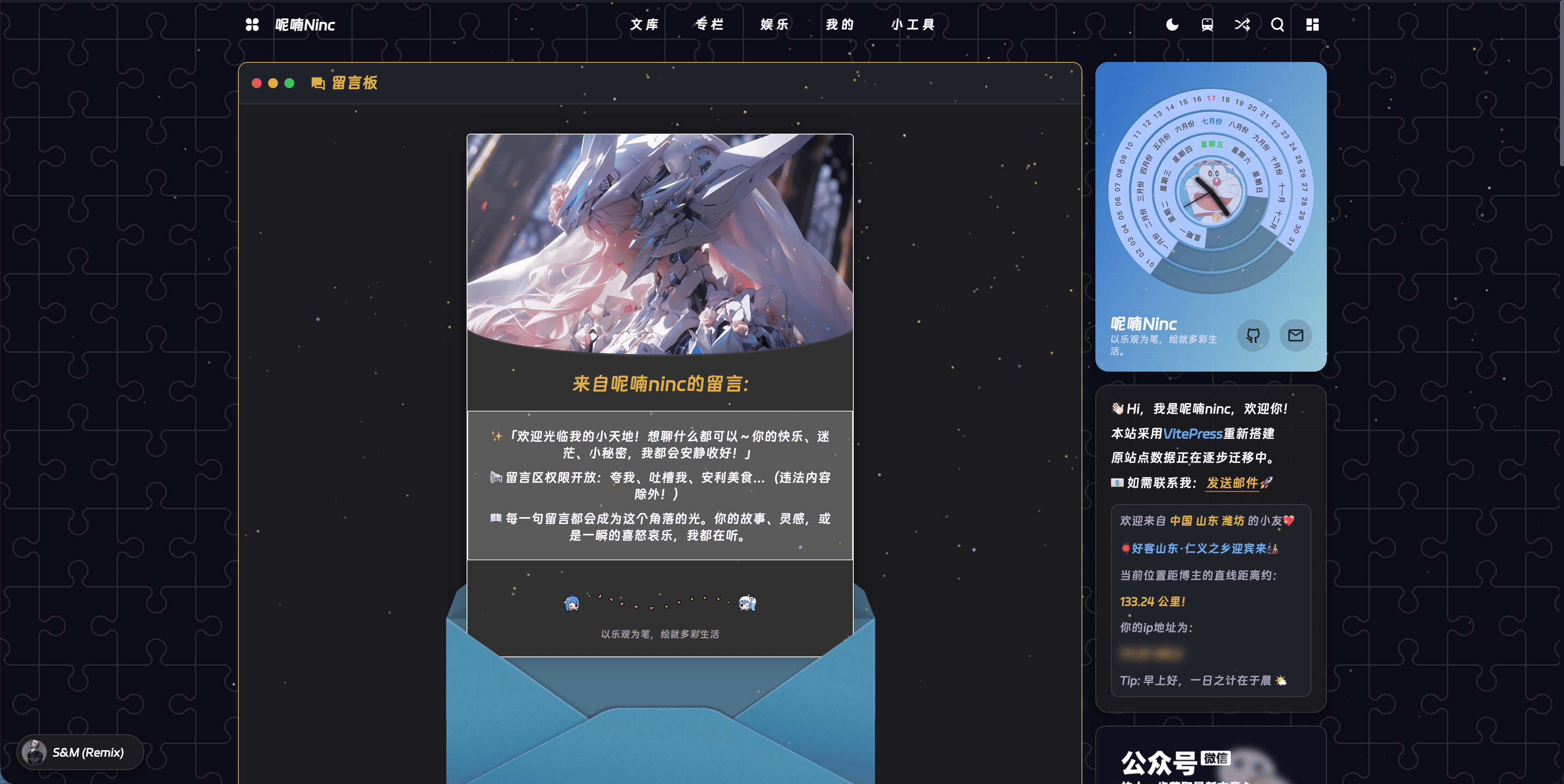
页面结构
友链页暂未开发
主题的友链展示页(Link 视图)仍在开发中,当前版本未包含该页面。circleOfFriends 与 dynamicLink 字段已预留,待友链页发布后即可使用。目前 friends 配置中只有 comments(留言板)会实际渲染。
字段说明
friends 主表
| 字段 | 类型 | 默认值 | 说明 |
|---|---|---|---|
circleOfFriends | string | '' | 友链圈(朋友圈)地址(预留,暂未渲染) |
dynamicLink | DynamicLinkConfig | 见下方子表 | 动态友链配置(预留,暂未渲染) |
comments | FriendsComments | 见下方子表 | 留言板配置(已可用) |
dynamicLink 子表(DynamicLinkConfig)
基于 Vercel + AirCode 部署的动态友链服务配置,三个字段均需填写才能正常拉取友链数据。
| 字段 | 类型 | 默认值 | 说明 |
|---|---|---|---|
server | string | '' | 动态友链服务器地址 |
app_token | string | '' | 应用 token |
table_id | string | '' | 数据表 ID |
comments 子表(FriendsComments)
| 字段 | 类型 | 默认值 | 说明 |
|---|---|---|---|
title | string | '留言板' | 留言板标题 |
author | string | 'Your Name' | 留言板作者 |
cover | string | '' | 留言板封面,需用户自行提供 |
message | string[] | [] | 留言板欢迎语数组,需用户自行提供,多条按顺序逐条展示(带逐条入场动画) |
bottom | string | '感谢你的留言' | 留言板底部文字 |
envelope | object? | 见下表 | 信封展开效果装饰图片,不配置则使用主题内置默认图 |
comments.envelope 子表
留言板页面在桌面端会展示一个信封展开动效:默认收起,鼠标悬浮时展开露出欢迎语。展开前后会用三张装饰图拼出信封造型,默认图片来自 hexo-butterfly-envelope 项目托管在 npm.elemecdn.com 上的 CDN。如果 CDN 不可用或想换成自托管的图片,可通过 envelope 覆盖。
| 字段 | 类型 | 默认值 | 说明 |
|---|---|---|---|
line | string? | 'https://npm.elemecdn.com/hexo-butterfly-envelope/lib/line.png' | 信封中部装饰线条图 |
before | string? | 'https://npm.elemecdn.com/hexo-butterfly-envelope/lib/before.png' | 信封展开前的封面图 |
after | string? | 'https://npm.elemecdn.com/hexo-butterfly-envelope/lib/after.png' | 信封展开后的底图 |
三张图需配套使用
line、before、after 三张图来自同一套素材,尺寸与位置在设计时互相配合。若只替换其中一张可能导致信封拼合错位,建议整套替换或整套保留默认值。窄屏(≤600px)下信封的展开前/展开后装饰图会自动隐藏,仅展示留言内容卡片。
替换为本地图片
将 line.png、before.png、after.png 放到 public/images/envelope/ 下,再修改配置即可避免依赖外部 CDN:
friends: {
  comments: {
    envelope: {
      line: '/images/envelope/line.png',
      before: '/images/envelope/before.png',
      after: '/images/envelope/after.png'
    }
  }
}
示例
import { defineThemeConfig } from 'vitepress-theme-ninc/defineThemeConfig'

export const themeConfig = defineThemeConfig({
  friends: {
    // 友链朋友圈地址
    circleOfFriends: 'https://circle.example.com',
    // 动态友链(Vercel + AirCode)
    dynamicLink: {
      server: 'https://your-aircode-server.vercel.app',
      app_token: 'your-app-token',
      table_id: 'your-table-id'
    },
    // 留言板
    comments: {
      title: '留言板',
      author: '示例博主',
      cover: '/images/cover/003405.jpeg',
      message: [
        '✨「欢迎光临我的小天地!想聊什么都可以~」',
        '📢 留言区权限开放:夸我、吐槽我、安利美食…(违法内容除外!)',
        '📖 每一句留言都会成为这个角落的光。'
      ],
      bottom: '以乐观为笔,绘就多彩生活'
    }
  }
})
渲染效果
friends.comments 渲染为留言板页面(/pages/comments):
- 留言板(comments):
message数组按顺序逐条展示欢迎语,cover作为信封内头图,底部展示bottom文案。 - 页面评论区:
CommentsView组件本身不含评论区;如需访客留言,请在页面 frontmatter 中设置comment: true(需先启用comment评论系统),由主题在页面末尾渲染 Twikoo 评论区。
留言板独立可用
配置 comments 各字段即可作为站点留言入口,不依赖友链功能。在 pages/comments.md 中引入 <CommentsView /> 组件并设置 frontmatter comment: true 即可渲染完整留言板:
---
title: 留言板
comment: true
---

<script setup>
import { CommentsView } from 'vitepress-theme-ninc/views'
</script>

<CommentsView />
动态友链字段为预留
dynamicLink 依赖基于 Vercel + AirCode 部署的动态友链服务。当前版本友链页暂未开发,该字段为预留项,待友链页发布后生效。届时使用前需自行部署后端并获取 server、app_token、table_id 三个参数。
注意事项
circleOfFriends 为预留字段
circleOfFriends 指向友链圈(朋友圈)的页面地址,例如 https://circle.example.com。当前版本为预留字段,待友链页发布后生效。
message 数组逐条展示
comments.message 支持配置多条欢迎语,前端会将所有条目按数组顺序依次渲染(带逐条入场动画)。建议每条控制在一到两行内,避免单条过长影响排版。
图片路径以
/开头,对应public/下的文件,如/images/xxx.png对应public/images/xxx.png。
配置会与默认值深合并,只需填写想修改的字段,详见 主题配置详解 - defu 深合并机制。
相关配置
comment评论 — 文章页评论系统配置aside侧边栏 — 侧边栏模块配置inject注入 — 页面 head 注入配置